Philips Hue Review
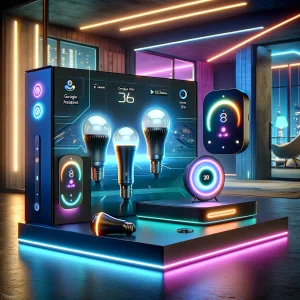
Philips Hue stands out as a leading smart lighting system, acclaimed for its exceptional versatility, user-friendly design, and a comprehensive suite of functionalities. It empowers users with the ability to control their lighting remotely—whether they’re at home or away—via a smartphone app or voice commands. The system offers a vibrant spectrum of colors, enabling users to craft the perfect ambiance for any occasion, from a serene blue for relaxation to a warm yellow for cozy evenings.
Moreover, Philips Hue seamlessly integrates with a multitude of smart home ecosystems, such as Amazon Alexa, Google Assistant, and Apple HomeKit, allowing for a unified and efficient smart home experience. Users can set customizable scenes, schedules, and even sync their lights with music or movies for an immersive entertainment setup.
Smart Control
Philips Hue offers sophisticated smart control via the Philips Hue app, available for both iOS and Android devices. This app enables users to remotely turn lights on or off, adjust brightness levels, and change colors. The app’s interface is intuitive, providing easy access to scenes and automation settings. Moreover, Philips Hue supports voice control through popular assistants such as Amazon Alexa, Google Assistant, and Apple HomeKit. This integration allows users to control their lights hands-free, making everyday tasks more convenient.
Ambiance Creation
Philips Hue is celebrated for its ability to create diverse lighting atmospheres. Users can choose from over 16 million colors and a wide range of white light shades, from warm to cool, to set the perfect mood for any occasion. The system’s pre-set scenes can transform a room’s ambiance instantly, whether it’s a relaxing evening at home or a festive gathering. The app also allows users to create custom scenes and schedules, ensuring the lighting always complements the activity and time of day.
Integration with Smart Home Systems
Philips Hue’s compatibility with numerous smart home systems makes it an essential component of a connected home. The system integrates with IFTTT, enabling complex automation scenarios such as turning lights on when motion is detected or dimming lights at sunset. Additionally, Philips Hue syncs with entertainment systems through the Philips Hue Sync app, allowing lights to react to music, movies, and games. This dynamic lighting experience enhances immersion and creates an interactive environment.
Energy Efficiency
Philips Hue bulbs are LED-based, making them significantly more energy-efficient than traditional incandescent bulbs. LED technology consumes less power, reduces heat output, and has a longer lifespan, leading to substantial savings on electricity bills and maintenance costs. The energy efficiency of Philips Hue contributes to environmental sustainability by lowering carbon footprints.
Final thoughts
Philips Hue stands out in the smart lighting industry due to its comprehensive feature set, seamless integration with smart home systems, and wide range of accessories. Its ability to create diverse lighting atmospheres, coupled with energy efficiency and smart control options, makes it a top choice for users seeking to enhance their home lighting experience. Whether you’re looking to automate your home, create the perfect ambiance, or save energy, Philips Hue offers a reliable and versatile solution.
For more detailed information, visit the Philips Hue Wikipedia page.
Accessories for Philips Hue System
Philips Hue offers an array of accessories designed to expand and enhance the smart lighting experience. Here are some of the most noteworthy accessories.
You can check for the latest prices for these specific models on Amazon to ensure you’re getting the best performance and value for your drone’s recording needs. As an Amazon affiliate, we want to let you know that if you click on the links provided and make a purchase, we will earn a commission at no additional cost to you. Your support helps us continue to provide valuable content and reviews. We appreciate your trust and support in our recommendations, as it allows us to keep offering insightful information and top picks for your needs. Thank you for considering our affiliate links and helping us maintain the quality of our services.
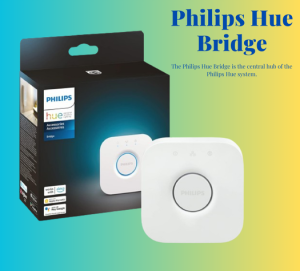
Philips Hue Bridge
The Philips Hue Bridge is the central hub of the Philips Hue system. It connects to your home Wi-Fi and allows control of up to 50 lights and accessories. The bridge enables all the advanced functionalities of the system, including remote control, voice control, and automation.
Philips Hue LightStrip Plus
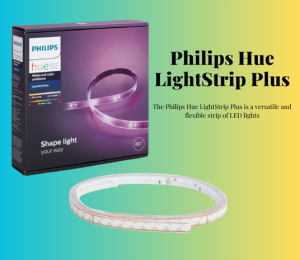
The Philips Hue LightStrip Plus is a versatile and flexible strip of LED lights that can be used for accent lighting in various settings, such as under cabinets, behind TVs, or around furniture. The lightstrip can be cut to size or extended with additional strips, providing customizable lighting solutions for different spaces.
Philips Hue Smart Play Light Bar
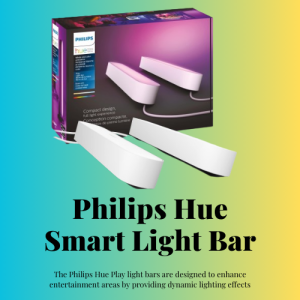
The Philips Hue Play light bars are designed to enhance entertainment areas by providing dynamic lighting effects that sync with on-screen content. Whether used for gaming, movie nights, or music listening sessions, Hue Play light bars create an immersive experience by responding to the action and rhythms.
Philips Hue Motion Sensor
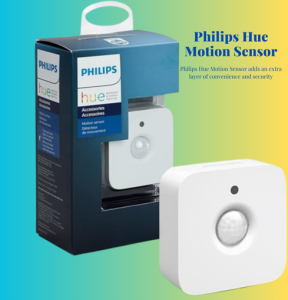
The Philips Hue Motion Sensor adds an extra layer of convenience and security to your smart lighting setup. It automatically turns lights on when it detects movement and off when no motion is sensed, ideal for hallways, bathrooms, and outdoor spaces. The motion sensor also includes a light sensor, allowing it to adjust lighting based on the room’s ambient light.
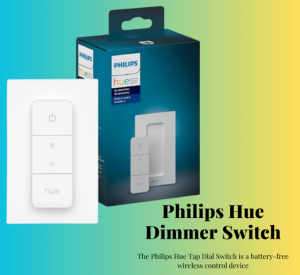
Philips Hue Tap Dial Switch
The Philips Hue Tap Dial Switch is a battery-free wireless control device that allows users to control their lights with customizable buttons. It features four buttons that can be programmed with different scenes or actions, offering versatile control options.
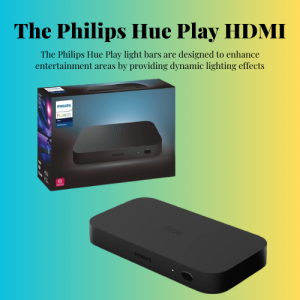
Philips Hue Play HDMI Sync Box
The Philips Hue Play HDMI Sync Box integrates effortlessly with the Philips Hue system. It connects to the Philips Hue Bridge, which acts as the control center, allowing the sync box to manage up to 10 Philips Hue lights simultaneously. This integration ensures a cohesive and enhanced smart home lighting experience.
How To Test Philips Hue Devices
Testing Philips Hue devices involves a few key steps to ensure they are working correctly and efficiently. Here’s a general process you might follow:
Initial Setup:
Device Connection:
Functionality Testing:
Compatibility Checks:
Routine and Automation:
Performance Evaluation:
- Assess the overall performance, including the consistency of connection, speed of response, and reliability over time.
Troubleshooting:
- If issues arise, consult the FAQs and support resources provided by Philips Hue2.
- For more complex problems, reach out to Philips Hue Support for assistance.
Remember, this is a general guide and the specific steps may vary based on the particular Philips Hue products you are testing. Always refer to the official Philips Hue documentation for the most accurate and detailed instructions.